
OUR SOLUTIONS
Controlled Document Management System
Our Solutions
Centralise your organisation’s documents within one environment
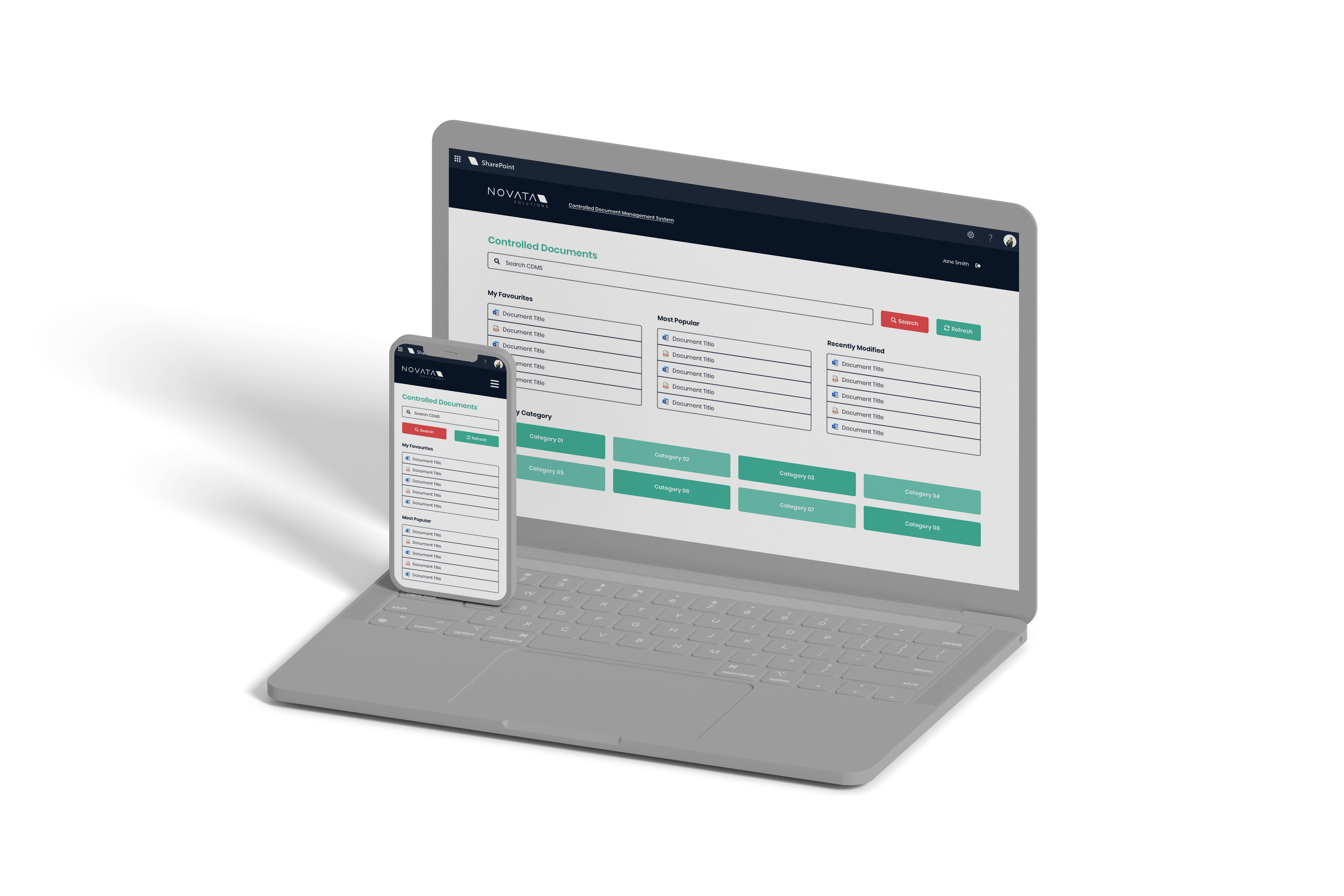
Our Controlled Document Management System (CDMS) captures all of your organisations controlled documents in one easy to use solution that sits on your own SharePoint tenancy. Allowing for policies, procedures, forms & templates to be accessed securely with permissions.
Streamlined Processes
Streamlined drafting, approval, publishing and archiving of controlled documents
Security and Governance
Secure and governed document libraries
Automated Processes
Automated intermittent review processes
Improves Business Growth
Retaining scalability with your business’s growth

CDMS Features
Our CDMS is presented in a modern, user-friendly web interface, complete with easy-to-use features that promote adoption.

Workflow Approval & Publishing
Implement flexible workflows for document reviews,reminders, approval, publishing and archiving

Authoring Libraries
Securely collaborate with your team using familiar tools such as Word, Excel, and PowerPoint. New document versions can be authored without affecting existing versions.

Version Control
Always view the latest version of documents and recover a full record of their previous versions.
Rich Metadata
Tag your documents to help end users find exactly what they need, when they need it. Easily update metadata on a per document level giving you fine grained control over how users find your documents.

Security & Permission
Allow the right people to access the relevant information, and lock down confidential documents with permissions.

Most Popular & Recently Modified
See all recently modified documents and most popular documents in one view.

Desktop & Mobile Support
Access your controlled documents wherever you are. Transition seamlessly from a desktop view into a mobile view for on the go access.

Office 365 Integration
Seamlessly integrate your CDMS to your Office 365 tenancy.

Teams Integration
View and access your Controlled Documents within Microsoft Teams.

Mobile & Email Approval
Approve documents directly from within an email and on your mobile devices.

Favourite Documents
Mark your commonly used document as favorites for convenient access.

Refinable Search
Find relevant documents through an intuitive search function.
Solutions
Authoring Libraries
Securely collaborate with your team using familiar tools such as Word, Excel, and PowerPoint. New document versions can be authored without affecting existing versions.
Authoring Library
The authoring repository that is used to manage the creation, updating, approval, and archiving of the documents. These libraries are locked down by permissions and are not accessible to all users.
Published Library
The published library is where a rendition of the approved document is copied to, either in its original file format or converted to a PDF. This library is crawled by the SharePoint search service and the documents are accessible via a custom search to all users who need to view and read the documents.
Archive Library
The archive library is where the document resides when it has been archived. Retention and disposal policies can be set to archive these documents. Access to this library is restricted. Archived documents cannot be edited at this stage; however, the document and associated metadata can be viewed
The additional features
- Familiar Office365 user experience
- Standard and consistent metadata classification
- Custom Actions: Automated periodic review process
- Power BI Dashboards
- Automated periodic task management
- Document templates
- Document checkout capabilities
- Security of documents
- Audit history
- Retention and Disposal Policies
- Auto classification using AI
The SharePoint Benefits of a CDMS
- Custom view and filters
- Automated alerts
- Tagged documents in email for alerts and notifications when document is distributed via email and SMS
- CDMS integration with:
- Word
- Excel
Coffee's on us!
Our 💟 for great ☕is second only to our dedication to delivering strategies that drive your business forward.
Let’s discuss how our solutions can fuel your success.


Head Office
Level 7, 12 St Georges Tce
Perth WA 6000
Contact Info
[email protected]
Ph 1300 NOVATA
Quick Links
ISO 27001
ISO 9001
SMB 1001 Gold

In the spirit of reconciliation Novata Solutions acknowledges the Traditional Custodians of country throughout Australia and their connections to land, sea and community. We pay our respect to their Elders past and present and extend that respect to all Aboriginal and Torres Strait Islander peoples today. This land always was, and always will be Aboriginal Land.

Novata Solutions is committed to embracing diversity and eliminating all forms of discrimination through education. We welcomes all people and is respectful of individual identities.